

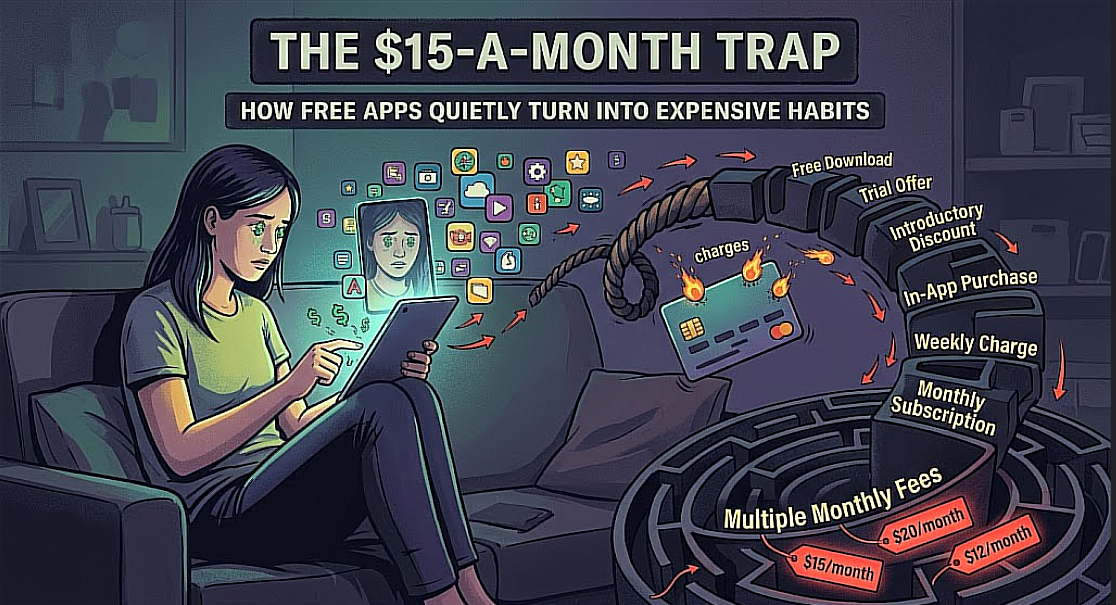
Nothing Is Really Free: How Free Apps Turn Into Expensive Monthly Habits
Downloading an apps that costs nothing feels like an easy win. You get a useful tool, a new game, an editing feature, or an AI assistant without paying anything upfront. The app may even promise to make everyday tasks faster, easier, or more enjoyable.
But what happens when the free version starts asking you to upgrade? Perhaps you want to remove a watermark, unlock a useful feature, generate another image, access a premium template, or avoid a daily usage limit. Suddenly, the app that cost nothing begins offering paid features for $4.99, $9.99, or $14.99.
Each price might seem reasonable on its own. The problem is that these small charges can accumulate across multiple apps, especially when users stop noticing how often they pay for digital conveniences.
A photo editor here, an AI writing tool there, a mobile game purchase, and a premium productivity feature can gradually become a meaningful monthly expense. Unlike a large purchase that demands careful consideration, a small digital payment may feel too insignificant to question.
This is the financial reality behind the freemium business model: many apps let users start for free, then generate revenue by encouraging them to pay for additional features, greater convenience, or fewer restrictions.
Freemium pricing is not inherently bad. Developers need ways to earn revenue, and paid features can provide genuine value. The challenge for consumers is recognizing when digital upgrades improve their lives and when they are spending money simply because an app has made the free experience inconvenient.
Understanding how these apps make money can help you enjoy useful digital tools without allowing small purchases to become another source of financial pressure.
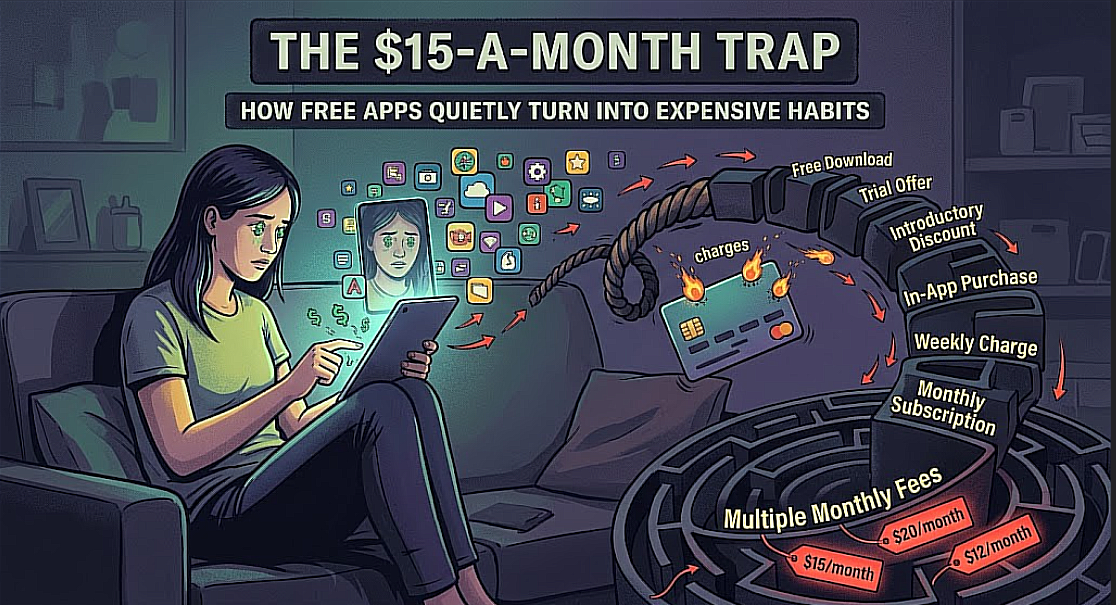
What Is the Freemium Business Model?
Freemium combines two ideas: free access and premium features.
An app using this model offers a basic version at no cost while charging for additional capabilities. Users can try the product before paying, and those who need more functionality can upgrade.
You will find this approach across many categories, including:
- Photo and video editing apps
- Artificial intelligence tools
- Productivity and note-taking software
- Language-learning platforms
- Mobile games
- Fitness and wellness apps
- Cloud storage services
- Design and presentation tools
- Music and entertainment platforms
The free version may be perfectly useful for some people. A basic editing app might handle occasional photos without requiring payment, while a premium version offers advanced filters, batch editing, or high-resolution exports.
The financial challenge emerges when the free version is deliberately limited in ways that encourage frequent upgrades.
Free access is the beginning of the sales process
Traditional software often required customers to purchase a product before using it. Freemium apps reverse that sequence.
You can download the app, explore its interface, invest time learning how it works, and perhaps begin relying on it before encountering its paid features.
By then, switching to another tool may feel inconvenient. You already know how the app works, and your projects, settings, or saved content may be connected to it.
The app can then present an upgrade as the easiest way to continue doing something you have already started.
For example, imagine spending 20 minutes editing a video before discovering that exporting it without a watermark requires a premium subscription. The upgrade might cost only a few dollars, but you are no longer deciding whether to buy an unfamiliar product. You are deciding whether to pay to finish work you have already invested time in.
This can make the purchase feel more urgent than it would have seemed before you downloaded the app.
Why developers offer free versions
There are legitimate reasons for the freemium model. Free access allows users to test a product, helps developers attract a larger audience, and gives people with different budgets a way to use basic features.
Revenue may come from subscriptions, one-time purchases, advertising, paid upgrades, or combinations of these methods.
The business model becomes less consumer-friendly when the app makes costs difficult to understand, repeatedly interrupts ordinary use with upgrade prompts, or encourages people to pay for features they do not genuinely need.
The important distinction is not whether an app has a free version. It is whether the pricing structure helps users make informed decisions.
How Small Apps Purchases Become Big Expenses
One reason digital spending can be difficult to control is that people often evaluate each purchase separately.
A $3.99 upgrade does not seem particularly expensive. Neither does a $6.99 monthly plan or a $2.49 in-app purchase.
But household budgets are affected by the combined total, not by how affordable each individual charge feels.
Consider a hypothetical consumer who pays for several digital services.
Digital expense | Monthly cost |
|---|---|
Photo editing app | $5.99 |
AI writing tool | $9.99 |
Premium game features | $4.99 |
Design templates | $6.99 |
Additional cloud storage | $2.99 |
Total | $30.95 |
The total is $30.95 per month, even though none of the individual charges exceeds $10.
That adds up to $371.40 over 12 months if the prices remain unchanged and all five payments continue.
This example is illustrative rather than an estimate of what the average consumer spends. Your actual costs will depend on which apps you use and how they charge.
The broader lesson is that small digital expenses deserve attention when they recur or overlap.
The danger of treating each payment as an exception
People often justify a digital purchase by focusing on the immediate benefit.
"I need this feature just for today."
"I'll use the premium version for this project."
"It's only a few dollars."
Those statements may be reasonable. Paying for a tool that solves a real problem can be a smart use of money.
However, the same justification can become expensive when repeated across several apps. A purchase that seems exceptional in isolation may be part of a broader pattern of spending.
The solution is not to avoid every digital purchase. It is to evaluate the combined cost of the tools you use and decide which ones deserve a place in your budget.
The Free Trial That Becomes a Paid Habit
Free trials are another common way apps introduce users to premium features.
A trial might provide seven days of advanced tools, a month of additional storage, or temporary access to a premium learning platform. Users can explore the benefits before deciding whether the service is worth paying for.
The financial risk appears when the trial automatically converts into a paid plan and the user forgets to cancel.
Why trial periods are easy to overlook
People often start free trials when they have an immediate need. They might want to edit a video, prepare a presentation, organize a project, or test an AI tool.
At the moment of signup, the trial feels temporary. The cancellation date may seem far away, and the user may expect to make a decision later.
Then everyday life takes over.
The trial expires, the paid plan begins, and the charge may continue for several months before the user notices it.
This can happen even when the app clearly disclosed the renewal terms. Forgetting a cancellation date is not necessarily evidence of deceptive conduct, but it can still create an avoidable expense.
How to protect yourself
Before activating a free trial, check four details:
- The trial's end date. Know exactly when the free period finishes.
- The renewal price. Confirm how much you will be charged after the trial.
- The billing frequency. Determine whether the plan renews weekly, monthly, or annually.
- The cancellation process. Find out whether cancellation must happen through the app, the app store, or the provider's website.
If you only want to test the service, consider setting a reminder before the renewal date. You can also cancel in advance if the provider allows you to retain trial access until the end of the period.
Do not assume that deleting an app cancels its subscription. Billing arrangements vary, so check the subscription settings associated with the account through which you signed up.
AI Credits: When One More Generation Costs Extra
Artificial intelligence tools have introduced another way for free apps to become expensive.
Some AI services offer a limited number of image generations, video creations, document analyses, or other tasks at no cost. Once users reach the limit, the app may ask them to purchase credits, subscribe to a premium tier, or pay for additional usage.
This system can be convenient because people pay for more access when they need it. But it can also make costs harder to predict.
Why AI spending can feel different
Traditional digital subscriptions often have a clearly stated monthly price. Credit-based systems may charge according to usage, the type of task, or the amount of computing required.
A user might purchase a small credit package to finish one project, then buy another package when the credits run out. If the tool becomes part of a daily workflow, these occasional purchases can become a regular expense.
Some users may also experiment more freely when a service initially provides free credits, only to discover that their preferred activities require paid access.
For example, a person creating marketing images might find that basic generations are free but high-resolution exports, advanced models, or repeated revisions consume additional credits.
The final cost depends on the provider's pricing rules and how the tool is used.
Calculate the cost of the task, not just the credits
Before paying for AI credits, estimate how much you expect to use the service.
Ask yourself:
- How many images, videos, or other outputs do I actually need?
- Does the provider charge different amounts for different tasks?
- Do unused credits expire?
- Is there a monthly subscription that would cost less than repeated credit purchases?
- Can a free alternative complete the task adequately?
- Will this tool save enough time or improve the result enough to justify its price?
These questions are especially important when a project requires multiple revisions. The first output may not be suitable, and additional attempts can consume credits faster than expected.
A tool that looks inexpensive for one task may be less economical when used repeatedly.
In-App Purchases: Paying to Remove Friction
Some apps charge for additional content or features without requiring a traditional subscription.
A user might purchase extra lives in a game, unlock a premium filter, buy a design template, remove advertisements, or pay to access a specific function.
These transactions can be legitimate and useful. The problem is that apps may present paid options at moments when users are particularly motivated to continue.
Paying because the free version becomes frustrating
Imagine playing a mobile game and reaching a difficult level. You have already invested time in the game, and the app offers an inexpensive purchase that would let you continue immediately.
Or perhaps you have nearly finished editing a photograph when the app reveals that the effect you selected requires a paid upgrade.
In both cases, the payment is linked to an immediate frustration or unfinished task.
The price may be small enough that you do not pause to compare alternatives. But repeated payments can turn an otherwise free activity into a costly habit.
A useful approach is to decide what you are willing to spend before opening the app. That gives you a boundary to follow when an unexpected offer appears.
Watch for repeated small transactions
Some purchases are one-time payments, while others can recur or be repeated frequently. Depending on the app, users may buy more credits, additional content, virtual currency, or separate feature packs.
Review the purchase history associated with your app-store or payment account periodically. A single transaction may be easy to forget, while a series of small payments can reveal a pattern.
If you discover that you are spending regularly on features you rarely use, consider disabling in-app purchases where your device permits it or requiring authentication before purchases can be completed.
These controls can be particularly helpful on shared devices or accounts used by children.
When a Premium Upgrade Is Actually Worth Paying For
Not every upgrade is a waste of money. In fact, refusing to pay for a useful tool can sometimes cost more in lost time or reduced productivity than the subscription itself.
The goal is to distinguish a genuine benefit from a purchase driven primarily by frustration, convenience, or promotional pressure.
Pay for a clear purpose
Suppose you regularly edit product photographs for a business. A premium editing app might save time, improve consistency, and provide export features that the free version lacks.
If those benefits help you work more efficiently or produce better results, the expense may be justified.
Now consider someone who edits one personal photograph every few months. The same subscription might offer little practical value.
The difference is not the app itself. It is how frequently the person uses it and what the paid features contribute.
Before upgrading, identify the specific problem the purchase will solve. If you cannot name a meaningful benefit, waiting is often the better choice.
Compare the subscription with alternatives
A premium app is not automatically the best option simply because its free version is limited.
Look for other tools that provide the necessary feature at a lower price, offer a suitable free tier, or charge a one-time fee instead of recurring payments.
However, compare more than the advertised price. Check feature limitations, export quality, privacy terms, device compatibility, and whether the alternative can handle your actual workload.
Switching tools may require time or learning, so the cheapest option is not always the most practical one.
Calculate the annual cost
Monthly prices can make subscriptions feel smaller than they are.
A $12 monthly plan costs $144 over a full year if the price remains unchanged. That might be worthwhile for a frequently used professional tool, but excessive for an app opened only a few times.
Annual billing can sometimes lower the effective monthly price, but it may also require a larger upfront payment and make it harder to recover unused value if your needs change.
Choose the billing option that matches your actual usage and cancellation flexibility, not merely the largest advertised percentage saving.
The Psychology Behind Upgrade Prompts
App pricing is not just about the amount charged. The way paid features are presented can influence whether users decide to spend.
An app might display an upgrade message when you reach a usage limit, place premium features beside free ones, or highlight a subscription as the recommended choice.
These techniques are not automatically improper. Businesses naturally promote paid products. But understanding how they affect decisions can help consumers avoid purchases they would not otherwise make.
The sunk-cost effect
The sunk-cost effect occurs when people allow the time, effort, or money they have already invested to influence whether they continue spending.
For example, after spending an hour building a design in an app, you may feel reluctant to switch tools when the app requires payment to export the finished project.
The time has already been spent, and paying seems like the easiest way to preserve the work.
Sometimes that is a reasonable decision. But the amount of time already invested should not be the only reason to upgrade.
Instead, compare the cost of paying with the realistic cost of alternatives. Can you export the work in another format? Is there a different tool that can open the project? Would starting again take too much time?
The best decision depends on the value of the completed work and the available options.
Convenience can hide recurring costs
People often pay for convenience because time and effort have value. That is not inherently a problem.
An app that removes advertisements, automates a repetitive task, or simplifies a complicated process can be worth the price.
The danger is allowing convenience purchases to accumulate without reviewing whether each one still serves a purpose.
If five apps each charge for a small convenience, the combined cost may be greater than the value you receive from any of them.
Periodically reviewing these purchases helps you distinguish useful spending from habits that continue simply because cancelling requires effort.
How to Audit Your App Spending in 20 Minutes
You do not need a complicated spreadsheet or a separate budgeting service to discover where your digital money is going. A short review of your subscriptions and purchase history can reveal charges you have overlooked.
Step 1: Review active subscriptions
Open the subscription settings for the app store or payment account you use. Review active plans, renewal dates, prices, and billing frequencies.
Do not rely solely on the apps installed on your device. You may have an active subscription for a service you rarely open or no longer use.
Also remember that subscriptions purchased directly from a provider may need to be managed through its website rather than the app store.
Step 2: Check recent purchase history
Review your recent digital purchases and look for recurring charges, credit packages, in-app purchases, and upgrades.
Pay attention to small transactions. A charge of a few dollars may not stand out individually, but repeated purchases can become significant.
If you find a charge you do not recognize, check the account details and receipt before assuming it is fraudulent. If it remains unexplained, contact the provider or payment service.
Step 3: Sort apps into three groups
Classify your paid apps according to how useful they are:
- Essential: You rely on the tool regularly, and its benefits justify the price.
- Occasional: You use it sometimes, but a free alternative or short-term plan might be sufficient.
- Unnecessary: You rarely use it or cannot identify a meaningful benefit.
This simple classification can help you prioritize which subscriptions to keep, reconsider, or cancel.
Step 4: Calculate the combined monthly and annual cost
Add together your recurring digital charges. Multiply the monthly total by 12 to understand the annual commitment, assuming prices remain unchanged.
For example, if your digital subscriptions total $24 per month, they amount to $288 per year.
That does not mean you should cancel everything. It means you can compare the cost with the value you actually receive.
Step 5: Set rules for future purchases
Choose a few boundaries that suit your habits. You might decide not to activate a free trial without setting a reminder, to wait 24 hours before buying a premium upgrade, or to require a clear purpose for every new subscription.
If you frequently buy AI credits, you might set a monthly spending limit or record the cost of each project.
The best rules are simple enough to follow consistently.
How to Avoid Paying for App Features You Don't Need
Once you understand how free apps generate revenue, you can make more deliberate choices about which features deserve your money.
Use the free version until you encounter a genuine limitation. There is little reason to pay for premium access before you know whether the app meets your needs.
Check whether the limitation matters. A watermark may be unacceptable for a professional project but irrelevant for a personal image. Decide based on the intended use.
Avoid upgrading under time pressure. If an app presents a paid offer when you are nearly finished with a task, pause and consider whether a practical alternative exists.
Look for one-time payment options. When available, a one-time purchase may suit occasional users better than a recurring subscription. Compare the total cost and feature support before deciding.
Disable unnecessary in-app purchases. Device-level controls can help prevent accidental purchases, particularly when an app makes frequent offers.
Set renewal reminders. Record the date and expected charge for any free trial or introductory offer that converts into a paid plan.
Review subscriptions quarterly. A tool that was useful during a temporary project may no longer justify its cost a few months later.
Be careful with annual plans. A lower effective monthly price does not help if you pay for a full year of a service you stop using after a few weeks.
Check cancellation confirmation. Save the confirmation and verify the subscription status if you do not want another charge.
Consider privacy alongside price. Free access may come with advertising, data collection, or other conditions. Review the privacy policy and permissions, particularly when an app handles personal documents, photographs, or business information.
Conclusions
Free apps can provide genuine value, but the word "free" does not guarantee that using them will remain costless. Freemium upgrades, subscriptions, AI credits, in-app purchases, and automatic renewals can turn small digital expenses into a meaningful annual commitment.
The most effective way to manage these costs is to understand what you are paying for and why. A premium feature that saves time, supports your work, or provides a benefit you regularly use may be worth every dollar. An upgrade purchased because an app made its free version frustrating may offer much less value.
Start by reviewing your active subscriptions and recent digital purchases. Calculate the combined cost, identify services you rarely use, and decide which paid features genuinely improve your life. Before activating a trial or buying credits, check the renewal terms, usage limits, and available alternatives.
You do not have to stop using free apps or reject every paid upgrade. You simply need to make sure the decision belongs to you rather than to a persistent upgrade prompt.
Ultimately, the real cost of a free app is not just what you pay today; it is what you continue paying without noticing. A little awareness can help you enjoy digital tools while keeping your money focused on the features and services that genuinely deserve it.