

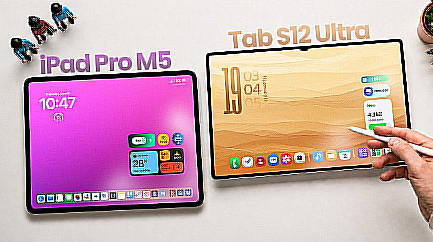
Samsung Galaxy Tab S12 Ultra vs. iPad Pro M5: Why Samsung May Be the Smarter Buy in 2026?
Apple has spent years convincing tablet buyers that the iPad Pro is the ultimate premium tablet. It has powerful Apple silicon, a stunning OLED display, professional creative applications, and the kind of polished design that makes an expensive device feel desirable before you even switch it on. But in 2026, there is a serious competitor that deserves more than a passing mention in Apple's shadow: the Samsung Galaxy Tab S12 Ultra.
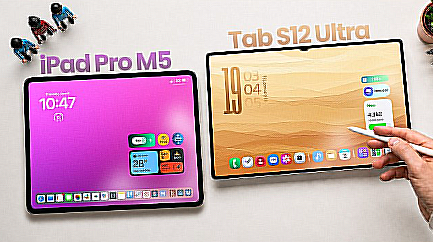
Samsung's latest flagship tablet arrives with a massive 14.6-inch Dynamic AMOLED 2X display, an included S Pen, expandable storage, Android 17, and Samsung DeX for a more desktop-like multitasking experience. It starts at $1,399.99 in the United States, putting it firmly in premium territory. Apple's 13-inch iPad Pro M5 starts at $1,299, before adding the accessories many buyers need to make it feel like a complete productivity machine.
Neither tablet is cheap. Neither is designed for someone who simply wants to watch a few videos and browse social media. These are expensive devices aimed at students, creators, professionals, artists, and people who want a large-screen computer alternative.
That makes the comparison particularly important. At these prices, buyers should expect more than impressive benchmark scores and attractive launch presentations. They should expect a device that fits their workflow, offers useful features without unnecessary purchases, and justifies the money spent.
The iPad Pro M5 has genuine advantages, particularly in processing performance and certain professional creative applications. Apple deserves credit for those strengths. But raw power does not automatically make a tablet the better purchase, and a polished ecosystem does not mean every buyer should accept its additional costs and limitations.
The Galaxy Tab S12 Ultra takes a different approach. It prioritizes screen space, stylus functionality, multitasking, storage flexibility, and a software experience that gives users more freedom to work the way they want.
Our verdict: for buyers who prioritize versatility, productivity, and out-of-the-box functionality, the Samsung Galaxy Tab S12 Ultra makes a compelling case as the smarter premium-tablet purchase in 2026. The iPad Pro M5 still has reasons to exist, but Apple should not expect its logo or processor alone to win this comparison.
1. Samsung's Biggest Advantage Is That It Thinks Beyond Raw Performance
Apple's M-series chips have helped transform the iPad Pro into a powerful device for demanding applications. The M5 chip is capable of handling complex creative tasks, graphics-intensive workloads, and on-device AI processing.
That is impressive. But here's the problem with using processing power as the main argument for buying a tablet: many users never come close to needing all of it.
If your daily routine involves taking notes, researching online, editing documents, managing spreadsheets, attending video meetings, watching tutorials, and switching between applications, an extremely powerful processor is only one part of the equation.
You also need enough screen space to work comfortably, an effective input method, useful multitasking tools, sufficient storage, and software that lets you complete tasks without unnecessary friction.
Samsung approaches the premium tablet from this broader perspective.
The Galaxy Tab S12 Ultra combines a large display with an included S Pen, expandable storage, and DeX. These features do not automatically make it faster than the iPad Pro M5, nor do they make every application better. What they do is give the Samsung tablet several practical advantages beyond processor performance.
Consider a student preparing an assignment. They might want a research document open beside handwritten notes, a browser available for references, and a PDF they can annotate directly. A creator might want to review footage while keeping project notes visible. A professional might need to reference a spreadsheet while drafting an email.
For these users, the quality of the overall workflow matters more than winning a benchmark comparison.
Apple's iPadOS has improved its multitasking and window management, so it would be unfair to claim that the iPad cannot handle these tasks. However, Samsung's combination of Android flexibility and DeX gives buyers another way to approach them.
The question is not which tablet has the biggest performance number. It is which one helps you get more done with less friction.
2. The Galaxy Tab S12 Ultra's 14.6-Inch Display Is a Genuine Advantage
Screen size can change how a tablet feels to use, and Samsung's 14.6-inch display is one of the Galaxy Tab S12 Ultra's most compelling features.
The iPad Pro M5 offers an excellent 13-inch Ultra Retina XDR tandem OLED display. Apple deserves credit for its image quality, contrast, brightness, and high-end visual experience. For photographers, illustrators, video editors, and people who value display accuracy, it remains a serious contender.
But Samsung offers more physical screen space.
The Tab S12 Ultra's 14.6-inch Dynamic AMOLED 2X panel gives users additional room for documents, timelines, reference material, and supported split-screen applications. Its 120Hz adaptive refresh rate also contributes to smooth scrolling and responsive interactions.
That extra space may sound like a small difference on paper, but it can make a meaningful difference when a tablet is used as a working device rather than simply a screen for consuming content.
Imagine editing a long document while keeping reference material visible. On a smaller display, you may find yourself repeatedly resizing windows, scrolling between sections, or switching applications. A larger screen can reduce some of that friction.
The same applies to digital art. More display space gives an artist a larger working canvas and more room for tool panels, although the exact benefit depends on the application's interface.
For video editing, a larger display can make timelines and preview windows more comfortable to use. For students, it can make reading and annotating documents less cramped.
Samsung's panel also supports a 120Hz adaptive refresh rate and advertises peak brightness of up to 1,600 nits under specified conditions. Those numbers make it competitive on paper, although brightness figures are not always directly comparable between manufacturers because testing conditions differ.
Does the larger screen mean Samsung wins every display comparison? No. Display quality involves more than diagonal size, including color accuracy, reflections, HDR performance, and how well applications use the available space.
But if your priority is getting as much useful workspace as possible from a premium tablet, Samsung has a persuasive advantage.
Apple offers an outstanding display. Samsung gives you more room to work on one.
3. Apple's Accessory Bill Deserves More Scrutiny
This is where the comparison gets uncomfortable for Apple.
The iPad Pro M5 starts at $1,299 for the 13-inch Wi-Fi model in the United States. That is already a substantial purchase. But buyers who want to draw, take handwritten notes, or use the device like a laptop may also want a compatible Apple Pencil and Magic Keyboard.
The Apple Pencil Pro is listed at $129, while the 13-inch Magic Keyboard is listed at $349.
Add those accessories to the base $1,299 tablet price and the total reaches $1,777 before tax.
That is not a trivial difference. It is the cost of turning an expensive tablet into a more complete productivity setup.
To be fair, not every buyer needs both accessories. Some people only want the iPad for creative applications, entertainment, or browsing. Others may already own compatible accessories. The total also changes with storage, cellular connectivity, promotions, and education pricing.
But for someone buying a new tablet specifically to take notes and work with a keyboard, those extra costs belong in the comparison from the beginning.
Samsung includes the S Pen with the Galaxy Tab S12 Ultra. Buyers can begin handwriting notes, annotating supported documents, sketching, and using stylus-based features without purchasing a separate Samsung pen.
That is an important practical advantage.
It does not mean the Samsung tablet is a complete laptop replacement straight out of the box. Its keyboard accessories cost extra, too, and buyers should include those prices when comparing a fully equipped setup. Samsung's promotional discounts may also change the final cost.
Still, an included stylus reduces the number of purchasing decisions and extra expenses for users who need pen input.
Apple's Pencil Pro is a capable accessory with features designed for creative work. The criticism is not that Apple charges money for a product that has no value. It is that the cost of building the desired setup can become substantial when the tablet itself already costs more than a thousand dollars.
At this price level, buyers should compare complete configurations rather than looking only at the price on the box.
Samsung deserves credit for including a tool that many tablet users consider essential. Apple should be judged on the total cost of the experience it sells, not just the impressive hardware at its center.
4. Samsung DeX Makes the Tab S12 Ultra More Versatile
A premium tablet should be capable of more than displaying applications one at a time. For people who want to work on the go, the way it handles windows, peripherals, and multitasking can matter just as much as the processor.
Samsung DeX is one of the Tab S12 Ultra's strongest differentiators.
DeX provides a desktop-style interface, with supported applications arranged in resizable windows. Depending on the setup, users can work with multiple windows, connect peripherals, and approach certain tasks more like they would on a computer.
This can be useful when writing reports, managing files, researching a topic, working with spreadsheets, or moving between communication tools and productivity applications.
For example, a student could use a browser to research a topic, keep notes open in another window, and refer to a PDF without constantly abandoning one task to open another. A professional could connect a keyboard and mouse and use the tablet for a lightweight mobile workstation.
That flexibility is not exclusive to Samsung. Apple's iPadOS has developed more sophisticated window management, and the iPad Pro supports external displays and demanding multitasking workflows. The M5 iPad Pro should not be dismissed as a simple oversized iPhone.
However, DeX remains a valuable option for people who want a desktop-like interface on a tablet.
The important distinction is that a desktop-style interface does not turn Android into Windows or macOS. Some desktop applications may not have equivalent Android versions, and some websites or programs may behave differently on a tablet. Professional users should verify that their essential software supports the workflow they intend to use.
Even with those limitations, Samsung gives users another way to organize their work. That choice can be particularly valuable for people who dislike being confined to a traditional tablet interface.
Apple's iPad Pro is powerful, but power is less useful when the software experience does not match the user's preferred workflow.
For buyers who want a flexible tablet that can double as a lightweight workstation, Samsung's approach deserves serious consideration.
5. Expandable Storage Is a Practical Win for Samsung
Storage is one of those specifications that buyers often overlook until it becomes a problem.
High-resolution photographs, video projects, downloaded files, offline media, creative applications, and large documents can consume storage quickly. The problem becomes particularly frustrating when a device is used for work and travel, where relying on an internet connection or an external drive is not always convenient.
The Galaxy Tab S12 Ultra supports microSD expansion of up to 2TB, according to Samsung's specifications. That gives users an option to expand their available storage without purchasing an entirely different tablet configuration.
This can be useful for photographers transferring files, creators storing reference media, students keeping offline course materials, or travelers who want films and other downloads available without a connection.
The iPad Pro M5 does not offer a microSD card slot. Buyers need to choose a suitable internal storage capacity when purchasing the device or rely on supported external storage and cloud services.
Apple's approach has benefits. Internal storage can provide a straightforward experience, and external drives can be useful for moving large files. But users cannot simply insert a microSD card into an iPad Pro to expand its internal capacity.
Samsung's expandable storage is therefore a meaningful advantage for people whose storage needs change over time.
There are limitations. A microSD card may not perform like the tablet's internal storage, and not every application allows its primary data to be moved to removable storage. Buyers should choose a reputable card with appropriate performance ratings and verify compatibility with their intended use.
Even so, flexibility matters. A user who regularly works with large files can appreciate having the option to add storage later rather than paying a substantial premium upfront for a higher-capacity tablet.
Samsung's expandable storage will not matter to everyone. For people who keep most of their data in the cloud and rarely download large files, it may have little impact.
But if you value the freedom to manage storage on your own terms, Samsung gets a clear point here.
6. Apple Has the Performance Advantage—and It Matters for Some Buyers
A Samsung-favoring verdict should not pretend the iPad Pro M5 is weak. That would make the entire comparison less credible.
Apple's M5 chip is a major strength. It is designed for demanding workloads, including complex graphics, video processing, and supported AI tasks. Apple's tightly integrated hardware and software can also help applications make effective use of the chip.
For professional users, that matters.
If you regularly edit high-resolution video in Final Cut Pro for iPad, work with demanding graphics applications, or rely on particular iPad-optimized creative tools, the iPad Pro M5 may be the better purchase.
Some applications are developed specifically for Apple's platform, and a tablet's usefulness depends heavily on the software available for the work you need to do. A device with excellent specifications is not a substitute for an application that supports your workflow.
The Galaxy Tab S12 Ultra uses MediaTek's Dimensity 9500 and delivers strong flagship-class performance, but it should not automatically be treated as a direct match for the M5 in every demanding workload. The processors are built for different platform environments, and performance varies depending on the task and application.
Buyers who prioritize sustained professional performance should look for independent tests of the exact applications they use, rather than relying on one benchmark or a manufacturer's headline claim.
But here is the important distinction: the iPad Pro's performance advantage is a reason to buy it when you need that performance, not a reason everyone else should buy it.
Most people choosing a tablet for study, writing, note-taking, research, browsing, media, and ordinary productivity are unlikely to use its full processing capability all day.
If the Samsung tablet already handles your applications comfortably while offering a larger display, expandable storage, an included S Pen, and DeX, the iPad's additional raw power may not justify the extra expense for your specific needs.
Apple wins an important category. Samsung can still win the purchase decision.
7. iPadOS Is Polished, but It Is Not the Right Fit for Everyone
Apple's software has genuine strengths. iPadOS is designed around the iPad's hardware, and the platform benefits from a strong selection of creative applications, consistent interface design, and close integration with Apple's wider ecosystem.
But its polished experience comes with a particular philosophy about how users interact with the device.
Some people love that consistency. Others find the platform less flexible than they would prefer.
Android offers a different set of options for application management, file handling, customization, and device interaction. Combined with Samsung's multitasking features and DeX, it can suit users who want greater control over how their tablet behaves.
The difference is particularly relevant to people who treat a tablet as a productivity tool rather than a companion for entertainment.
File handling is a good example. The iPad has a Files application and supports external storage, so it is incorrect to say that iPads cannot manage files. However, users who prefer a more traditional folder-based workflow may find Android's approach more comfortable in certain situations.
Application availability also matters. Apple's ecosystem includes professional applications that may not have direct Android equivalents. Conversely, an Android workflow may suit users who rely on particular apps, services, or customization options.
Neither platform wins universally.
The real mistake is buying an iPad simply because its processor is powerful and assuming the software will automatically suit your work. Equally, buying Samsung because Android is flexible makes little sense if your essential creative application only works well on iPadOS.
Before spending this much, list the applications you use every week and confirm that they work properly on your chosen platform. That simple exercise is more useful than comparing marketing slogans.
For buyers whose workflows fit Android, Samsung's flexibility makes the Tab S12 Ultra especially compelling. Apple should not be penalized for building a distinct software experience, but customers should not have to ignore its limitations when making a purchase decision.
8. Samsung's AMOLED Display and Included S Pen Make It a Creator's Playground
Samsung's tablet is particularly appealing to people who want a large canvas for creativity.
The Galaxy Tab S12 Ultra's 14.6-inch AMOLED display provides room for digital illustration, handwritten notes, document annotation, and compatible creative applications. The included S Pen gives users a way to interact with the screen using handwriting and drawing rather than relying entirely on touch input.
For artists and designers, a stylus can change the way a tablet is used. It allows more precise selections, natural handwriting, sketching, and detailed edits in supported applications.
Students can annotate PDFs and lecture slides. Professionals can mark up documents and sign files where supported. Creators can sketch concepts, write storyboards, and organize ideas without needing a separate pen accessory.
Apple also deserves credit in this category. The Apple Pencil Pro supports advanced input features, and the iPad has a strong creative-app ecosystem. For some illustrators and professionals, those applications may be the deciding factor.
That means Samsung should not be declared the universal winner for digital artists without examining their software requirements.
But the included S Pen remains a valuable advantage for buyers who want stylus functionality from day one. There is no separate pen purchase to make, and the larger display offers generous working space.
Samsung's tablet can be especially attractive to users who combine creative work with research and productivity. They can use the stylus for notes and annotation, the large display for reference material, and DeX for supported multitasking workflows.
The result is a device that feels designed around doing different kinds of work rather than excelling in only one narrow category.
9. The Galaxy Tab S12 Ultra Is Not Cheap—and Samsung Should Be Criticized Too
Samsung's advantages do not erase its price.
The Galaxy Tab S12 Ultra starts at $1,399.99 in the United States for the 256GB Wi-Fi model. Higher-capacity configurations cost more, and adding a keyboard increases the total further.
That is a serious amount of money for a tablet.
The S Pen is included, but the keyboard is not. Anyone planning to use the Tab S12 Ultra as a laptop alternative needs to include the price of a compatible keyboard, along with any other accessories they consider essential.
Samsung's large screen also comes with a trade-off in portability. The tablet weighs approximately 692 grams in its Wi-Fi configuration, before adding a keyboard cover. That makes it a substantial device to carry around, particularly for people who prefer a compact tablet for reading or note-taking while standing or commuting.
Its large size can also make handheld use less comfortable for long periods. The same feature that makes it excellent for split-screen work can make it cumbersome for casual use.
Android app optimization is another consideration. While many popular applications work well on large Android tablets, some may not take full advantage of the display or provide the same depth of professional functionality as their iPad counterparts.
Samsung also cannot promise that every workflow will be smoother simply because DeX exists. Desktop-style multitasking is helpful only when the applications you use support it effectively.
These limitations matter. A Samsung-favoring review should not hide them.
However, they do not erase the device's strengths. They simply define the kind of buyer who is most likely to appreciate it.
If you want a large, flexible tablet for multitasking, handwritten input, and a mixture of creative and productivity tasks, the S12 Ultra can justify its price. If you want a compact device for occasional browsing, it is probably more tablet than you need.
The same logic applies to the iPad Pro. Premium hardware is worth paying for only when it serves a real purpose in your life.
10. Software Support and Long-Term Value Matter More Than Launch Hype
A premium tablet should be evaluated over several years, not just on the day it arrives in stores.
Samsung says the Galaxy Tab S12 series supports up to seven generations of operating-system upgrades and seven years of security updates from its global launch. That is an important commitment for people who plan to keep their devices for a long time.
Long software support can help extend a tablet's useful life, although actual update timing and availability may vary by model, market, and provider.
Apple also has a strong record of supporting iPads for extended periods, and the company does not always announce a fixed support duration for every model in the same way Samsung does. It would therefore be misleading to conclude that Samsung will necessarily support the Tab S12 Ultra longer than the iPad Pro M5.
Instead, buyers should consider the complete ownership experience: software support, battery longevity, repairability, accessory availability, warranty coverage, and how well the device retains value.
Storage flexibility can contribute to Samsung's long-term appeal because users can add a compatible microSD card as their needs change. The included S Pen also means one essential accessory is already accounted for.
Apple's hardware performance may help it remain useful for demanding applications over time, and its ecosystem can be particularly attractive to people who already own other Apple devices.
The best long-term value is the device that remains useful for your needs without forcing you to replace it early or spend unnecessarily on accessories and upgrades.
On that measure, Samsung has a strong case—but buyers should choose based on the way they intend to use the tablet, not on the assumption that one manufacturer's devices always last longer.
11. Which Tablet Should You Actually Buy?
The answer depends on what you expect your tablet to do.
Buy the Samsung Galaxy Tab S12 Ultra if:
- You want a very large 14.6-inch display for multitasking, documents, creative work, and entertainment.
- You want an S Pen included rather than purchasing a stylus separately.
- You value expandable storage and the option to add a compatible microSD card later.
- You want Samsung DeX and a more desktop-like way to organize supported applications.
- You prefer Android's customization and file-management flexibility.
- You want one device for handwritten notes, research, productivity, and media consumption.
Buy the Apple iPad Pro M5 if:
- Your work depends on specific iPadOS applications or professional creative workflows.
- You prioritize Apple's M5 performance for demanding supported tasks.
- You already own Apple accessories and other devices that integrate closely with the iPad.
- You prefer Apple's software approach and do not need Samsung's particular multitasking or storage features.
- You value the iPad's creative-app ecosystem enough to justify its total cost.
Consider whether you need either flagship
If you mainly browse the web, watch videos, read, and take occasional notes, a less expensive tablet may meet your needs comfortably. You do not need to spend more than $1,000 simply because the premium models exist.
The same advice applies if you are trying to replace a laptop. Test your actual workflow before making the switch. Confirm that the applications, file handling, external display support, and keyboard experience meet your needs.
A tablet can be an excellent productivity tool without being a complete substitute for every laptop.
Conclusions
The Samsung Galaxy Tab S12 Ultra and Apple iPad Pro M5 are both premium tablets, but they make different promises.
Apple emphasizes processing power, display quality, and a polished creative ecosystem. The iPad Pro M5 is an excellent choice for people whose work benefits from its performance and who depend on specific iPad applications.
But Samsung's latest flagship makes a compelling argument that premium-tablet value should be measured by more than the chip inside the device.
The Galaxy Tab S12 Ultra gives buyers a 14.6-inch AMOLED display, an included S Pen, expandable storage, DeX multitasking, and a flexible Android experience. Those features can make it a more useful all-round tool for students, professionals, creators, and users who want their tablet to handle several different kinds of work.
Samsung's $1,399.99 starting price is not cheap, and its keyboard costs extra. We should not pretend otherwise. The iPad Pro's $1,299 starting price is lower for the 13-inch Wi-Fi model, while its optional Pencil and keyboard can make a fully equipped setup expensive. Buyers should compare equivalent configurations and current offers before deciding.
Still, Samsung's included stylus and broader workflow flexibility strengthen its value proposition. For users who want a large working canvas, multitasking freedom, and fewer restrictions on how they organize their work, the Galaxy Tab S12 Ultra has the more persuasive case.
Apple wins where its processor and professional applications matter most. Samsung wins for buyers who place greater value on screen space, practical flexibility, expandable storage, and a tablet that arrives ready for stylus-based work.
Our pick for most versatility-focused premium-tablet buyers: Samsung Galaxy Tab S12 Ultra. It offers a compelling blend of screen size, useful included hardware, and flexible productivity features. The iPad Pro M5 remains a better fit for some specialized workflows, but Apple should not get the automatic victory simply because its chip is powerful.
In 2026, buying the best tablet means choosing the device that earns its place in your daily life—not the one with the most prestigious logo.
For more consumer-focused technology and money decisions, visit Finiuo. Readers looking for legal and consumer-rights information can explore Jurnza, while Dryzen Royal covers dry fruits and nutrition.
The final word? If you want a flexible, large-screen tablet that balances productivity with creative freedom, give Samsung the serious look it deserves. The iPad Pro may have the muscle, but the Galaxy Tab S12 Ultra makes a strong case for being the smarter tool to live with